Get information about a collection or document
You can get information about a collection or a document from your Dashboard or using the API. Use the following guides according to whether the collection or a document concerns a transaction or an account onboarding.
Transaction documents
There are two methods you can use to get information about a collection or a document related to a transaction:
- Get information about individual documents from your Dashboard.
- Call the API to get information about collections and documents.
You can only call the API to get information about supporting documents for transactions if you collect documents with the API.
Dashboard
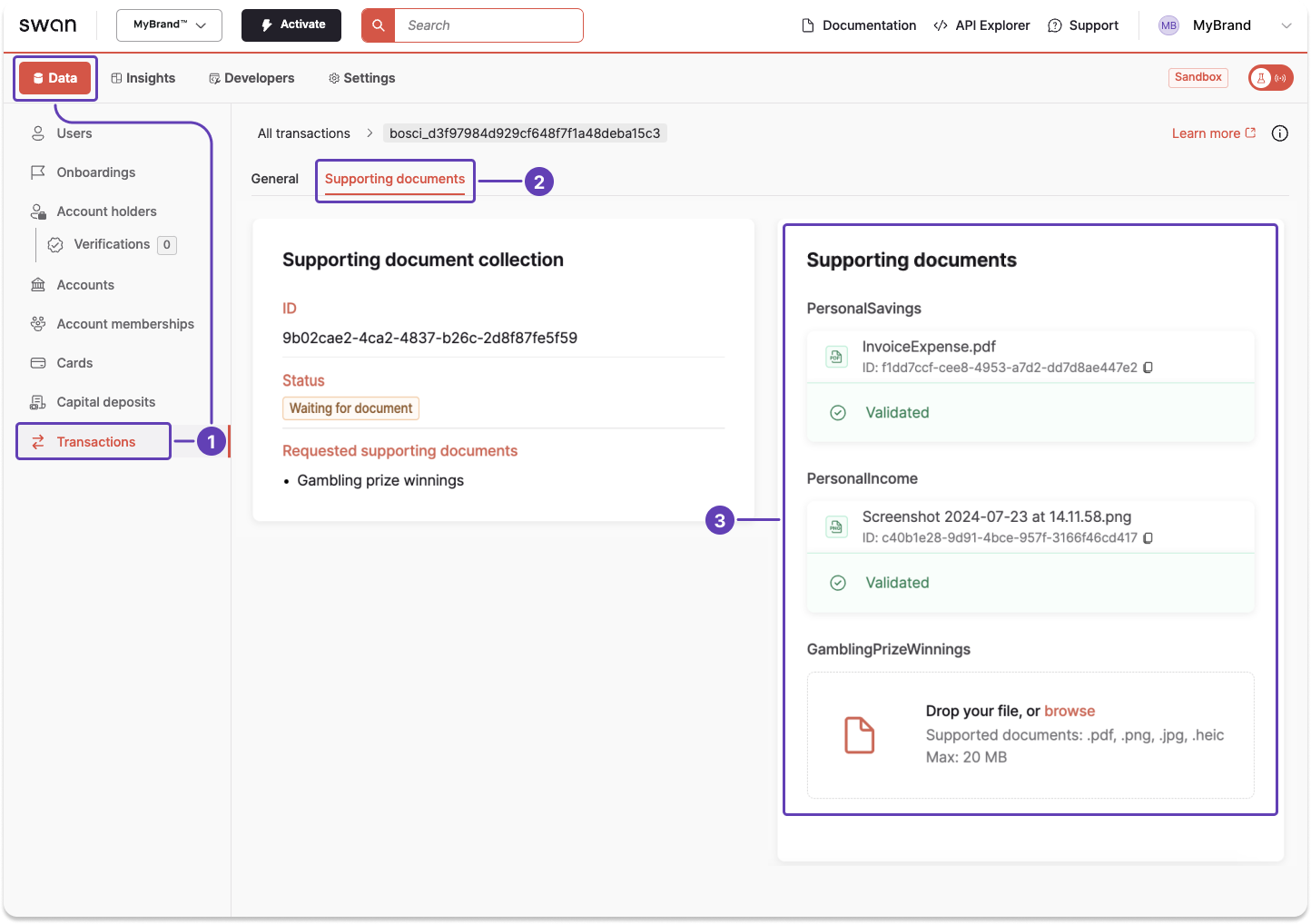
Use the Dashboard to review information about a transaction document.
- Go to Data > Transactions.
- Open a transaction, then go to Supporting documents.
- Review all available information about your documents.
API
- First, retrieve the required transaction ID.
- Call the
transactionquery. - Enter the transaction ID retrieved in step 1 (line 2).
- Include
purposeDetailsunderrequiredSupportingDocumentPurposesto see what's needed if the purpose isOther(line 14). - Add all other objects you need to review. For example,
SupportingDocumentRefusedStatusInfo(lines 16-19) to get refusal details.
Query
Open in API Explorerquery getTransactionCollectionInfo {
transaction(id: "$TRANSACTION_ID") {
... on SEPACreditTransferTransaction {
id
supportingDocumentCollections {
edges {
node {
statusInfo {
status
}
id
requiredSupportingDocumentPurposes {
name
purposeDetails
}
supportingDocuments {
statusInfo {
status
... on SupportingDocumentRefusedStatusInfo {
__typename
reasonCode
reason
refusedAt
status
filename
}
}
}
}
}
}
}
}
}
Payload
In this example, the collection status is WaitingForDocument (line 10).
The required document purpose is ProofOfOriginOfFunds (line 15).
purposeDetails is null here because this is a standard purpose (line 16).
{
  "data": {
    "transaction": {
      "id": "$TRANSACTION_ID",
      "supportingDocumentCollections": {
        "edges": [
          {
            "node": {
              "statusInfo": {
                "status": "WaitingForDocument"
              },
              "id": "$COLLECTION_ID",
              "requiredSupportingDocumentPurposes": [
                {
                  "name": "ProofOfOriginOfFunds",
                  "purposeDetails": null
                }
              ],
              "supportingDocuments": [
                {
                  "statusInfo": {
                    "status": "WaitingForUpload"
                  }
                }
              ]
            }
          }
        ]
      }
    }
  }
}
Onboarding documents
There are two methods you can use to get information about a collection or a document related to an account onboarding:
- Get information about individual documents from your Dashboard.
- Call the API to get information about collections and documents.
Dashboard
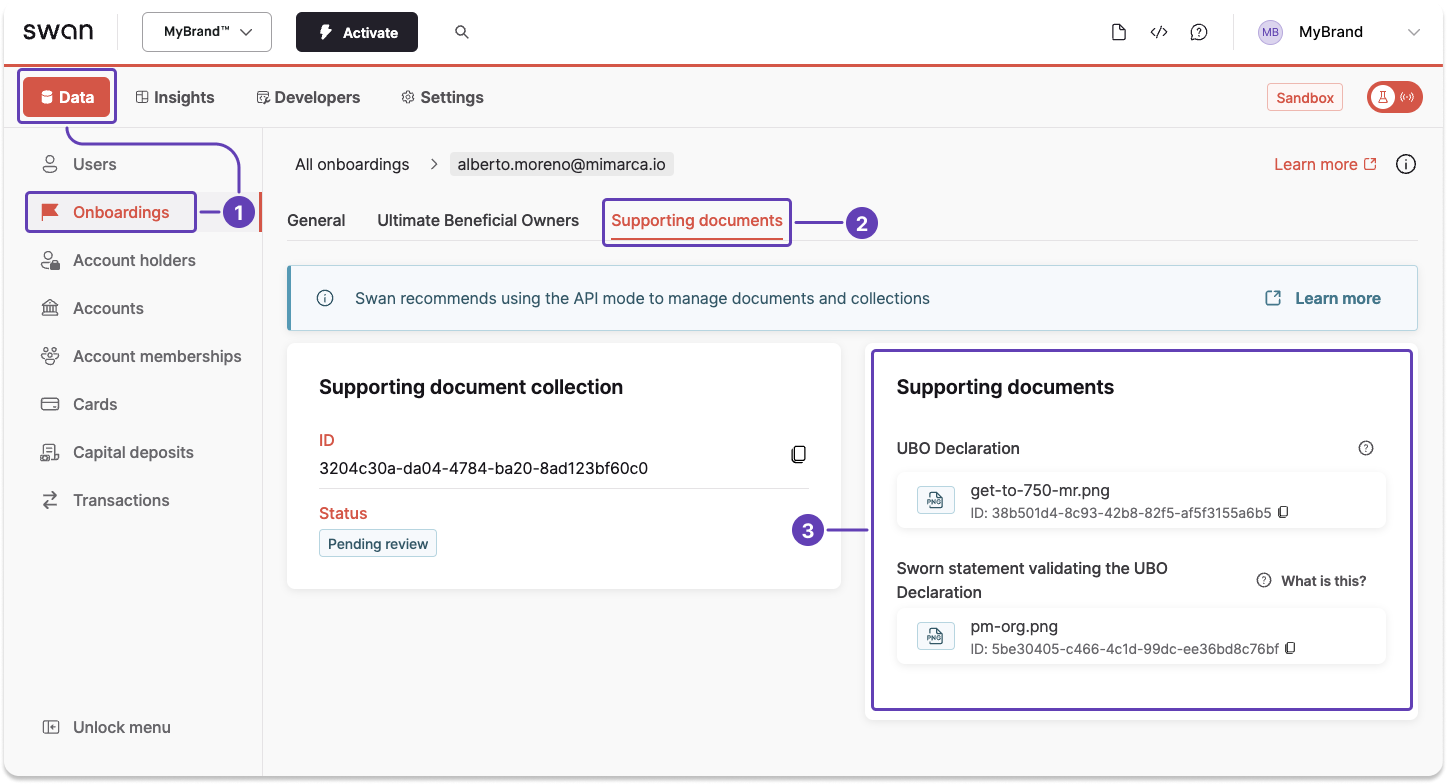
Use the Dashboard to review information about an onboarding document.
- Go to Data > Onboardings.
- Open an onboarding, then go to Supporting documents.
- Review all available information about your documents.
API
You can use either the user's onboarding ID or, if their onboarding is Finalized, their account holder ID, to get information about a supporting document collection or an individual document.
- First, retrieve the required onboarding ID, either with the API or from your Dashboard > Data > Onboardings.
- Call the
accountHolderOnboardingquery. - Enter the onboarding ID retrieved in step 1 (line 2).
- Include
purposeDetailsunderrequiredSupportingDocumentPurposesto see what's needed if the purpose isOther(line 8). - Add all other objects you need to review.
- Example: add
supportingDocumentPurposeto know which supporting document is required (line 11). - Example: add
supportingDocuments>statusInfo>status(lines 14-15) to retrieve the document's status. - Example: add
supportingDocuments>statusInfo>status(lines 14-15) to get information about why a document wasRefused(line 16).
- Example: add
This guide uses the onboarding ID.
If the onboarding is Finalized, use the account holder ID to call the accountHolder query instead.
Query
Open in API Explorerquery getOnboardingCollectionInfo {
accountHolderOnboarding(id: "$ONBOARDING_ID") {
... on IndividualAccountHolderOnboarding {
supportingDocumentCollection {
id
requiredSupportingDocumentPurposes {
name
purposeDetails
}
supportingDocuments {
supportingDocumentPurpose
supportingDocumentType
updatedAt
statusInfo {
status
... on SupportingDocumentRefusedStatusInfo {
__typename
filename
reason
reasonCode
refusedAt
status
}
}
}
}
}
... on CompanyAccountHolderOnboarding {
supportingDocumentCollection {
id
requiredSupportingDocumentPurposes {
name
purposeDetails
}
supportingDocuments {
supportingDocumentPurpose
supportingDocumentType
updatedAt
statusInfo {
status
... on SupportingDocumentRefusedStatusInfo {
__typename
filename
reason
reasonCode
refusedAt
status
}
}
}
}
}
}
}
Payload: Validated
In this example, the required document purpose is Other (line 8).
purposeDetails is "Most recent business income tax return (aangifte inkomstenbelasting)" (line 9).
The document was received, reviewed, and Validated (line 18).
{
  "data": {
    "accountHolderOnboarding": {
      "supportingDocumentCollection": {
        "id": "$COLLECTION_ID",
        "requiredSupportingDocumentPurposes": [
          {
            "name": "Other",
            "purposeDetails": "Most recent business income tax return (aangifte inkomstenbelasting)"
          }
        ],
        "supportingDocuments": [
          {
            "supportingDocumentPurpose": "Other",
            "supportingDocumentType": null,
            "updatedAt": "2026-04-16T08:37:47.625Z",
            "statusInfo": {
              "status": "Validated"
            }
          }
        ]
      }
    }
  }
}
Payload: Refused
In this example, the required document purpose is UBODeclaration (line 8). The document was Refused (line 18) with reason code InvalidDocument (line 22).
purposeDetails is null here because this is a standard purpose (line 9).
{
  "data": {
    "accountHolderOnboarding": {
      "supportingDocumentCollection": {
        "id": "$COLLECTION_ID",
        "requiredSupportingDocumentPurposes": [
          {
            "name": "UBODeclaration",
            "purposeDetails": null
          }
        ],
        "supportingDocuments": [
          {
            "supportingDocumentPurpose": "UBODeclaration",
            "supportingDocumentType": "UBODeclaration",
            "updatedAt": "2026-04-14T15:16:48.507Z",
            "statusInfo": {
              "status": "Refused",
              "__typename": "SupportingDocumentRefusedStatusInfo",
              "filename": "file_name.pdf",
              "reason": "",
              "reasonCode": "InvalidDocument",
              "refusedAt": "2026-04-14T15:16:48.507Z"
            }
          }
        ]
      }
    }
  }
}